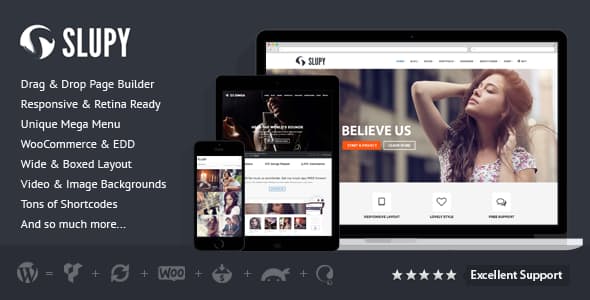
Overview
Extended Feature List
- Responsive Design
- Retina Ready
- Sticky Header
- Excellent Layout Settings
- Parallax Pages
- Supported All Posts Format (Standard, Aside, Gallery, Link, Image, Quote, Status, Video, Audio, Chat)
- 6 Different Page Template (Default, Contact, Full Width, One Page, Left Sidebar and Right Sidebar)
- AJAX Blog & Portfolio Pagination
- AJAX Search
- AJAX Contact Form
- Visual Composer Page Builder
- 40+ Shortcodes
- Alternative Shortcode Manager
- Mega Menu
- Unlimited Sidebar
- WooCommerce Integration
- One Page Support
- Parallax Image & Video Backgrounds
- Advanced Page Header Management
- Wide & Boxed Layout
- One Click Color Change Option
- Typography Management with 600+ Google Fonts
- Revolution and OWL Slider
- Ready All Widgets
- Icon Fonts
- Clean Code
- Transition Ready .po/.mo files included
- Excellent Menu Additional
- Unlimited Color Options
- Valid HTML5 / CSS3
- Filterable Portfolio
- 4 Header Types
- Footer Columns Options
- Made With Debug Mode TRUE
- Free Lifetime Updates and Support
- WordPress 3.9+ Ready
- Crossbrowser Compatible
Advanced Theme Options Panel
General Options
- Image or Text Logo Type
- Optional Sticky Logo
- Choose Retina @2x Logo
- Choose Favicon & Apple Touch Icons
- Enable / Disable Responsive, Boxed Layout, Sticky Menu and Back Top Button
- Google Analytics and Custom JS Section
Header & Footer Options
- 5 Header Models
- Top Bar Text – Supported HTML
- Choose BreadCrumb Portfolio and Blog Page Links
- Change Image Background for Page Headers
- Change Page Header Space, Text Color, Link Color and Link Hover Color
- Menu Additional Position (Top Bar Left, Top Bar Right or Show With Menu)
- Add Custom Menu Additional Items and Social Links
- Menu Additional Custom Menu Items Supported Shortcode
- 16 Different Footer Columns Types
- Write a Copyright Text
- 2 Footer Styles (Dark & Light)
Theme Styling
- 5 Defined Colors
- One Click and Change Colors
- Choose Headings, Main Menu, Sub Menu and Body Font Type, Font Sizes and Color
- Link Colors
- Google Fonts Subsets
- Write Your Global Custom CSS
Blog
- Enable / Disable Masonry Style Blog
- Choose Masonry Max Columns (2, 3 or 4)
- Choose Masonry Effects (6 Effect)
- Enable / Disable Blog Sidebar (Left or Right)
- Enable / Disable Icons for Posts Formats
- Choose Meta Position (Content After, Media After, Heading After or Together with Read More Button)
- Enable / Disable Post Meta (Author, Date, Comments Count, Tags and Categories)
- Choose Read More Button Style (Button or Text)
- Choose Pagination Type (Older – Newer, Load More or Page Numbers)
- Choose Single Post Sidebar
- Enable / Disable Related Posts (By Categories or By Tag)
- Enable / Disable Next & Prev Article Link
- Enable / Disable About the Author
- Manage Users Social Links
- Manage Sidebars. Add, Edit or Remove
Other Settings
- Manage Portfolio Default Settings
- Manage WooCommerce Sidebar and List Settings
- Manage Contact Form
- Manage Image Sizes
- Import & Export Framework Settings
Shortcodes
- Blog
- Portfolio
- Latest Projects
- Sidebar
- Accordion & Toggle
- Alert Boxes
- Blockquote
- Buttons
- Columns Layout
- Contact Forms
- Dropcap & Iconbox
- Feature Box
- Feature Icons
- Gallery
- Gap
- Clear
- Icons – FontAwesome
- Milestone
- Modal
- Parallax
- Photo Stream
- Pie Chart
- Pricing Table
- Progress Bars
- Responsive Media
- Sliders
- Tables
- Tabs
- Team
- Testimonials
- Typography
- Button Set
- And More…
Compatible Plugins
- Visual Composer (Included)
- Revolution Slider (Included)
- Contact Form 7
- Breadcrumb Trail
- ThemeSama Shortcodes (Included)
- WooCommerce
- WPML (Not Included)
- PolyLang Multilanguage
- Gravity Forms (Not Included)
- Ninja Forms
- Easy Digital Downloads
What's included
- The full themeEvery file from the developer's release, in one zip.
- Unlimited sitesInstall it on your own and your clients' sites.
- GPL licensedFree to use, study and modify.
- No paymentFree to download, no card needed.
How to install
- 1Download the zip file from this page.
- 2In WordPress, go to Appearance → Themes → Add New → Upload Theme.
- 3Choose the zip, click Install Now, then Activate.
Questions
Is this the developer's own release?
Yes. It is the release published by the original developer, redistributed under the GNU General Public License. The GPL allows anyone to share and resell the code.
Do I get a license key or automatic updates?
No. License keys, one-click updates and support come from the developer's own paid plans. To update, download the newer version here when it is listed and install it over the old one.
Can I use it on more than one site?
Yes. The GPL puts no limit on the number of sites, including client sites.
Why is it free?
During our launch every download that is available on GPL Store is free. Nothing is charged and no card is asked for.