Overview
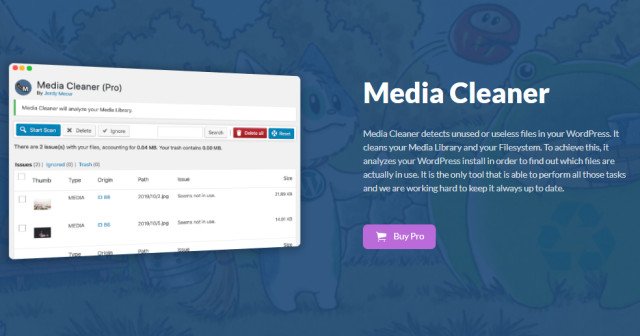
Media Cleaner detects unused and useless files from your WordPress. It cleans your Media Library and your Uploads Directory. For this, it analyzes your whole WordPress install and scans to find how your files are actually in use. It features many options and filters. It is the only tool that is able to perform all those tasks and we are constantly working on it to make it better and simpler to use.
Powerful Scan
The Media Cleaner checks your post types (posts, pages, portfolios, products, etc), your meta, widgets, theme, and resolves the shortcodes to find more. It also has specific checks to support the popular Page Builders (Pro Version). It will be easy to discover the broken media entries, unused media entries, files and orphan images (retina) in your system.
Trash System
The result of this scan will be displayed on the dashboard of the Media Cleaner. From there, you can choose to move them in the trash. After testing your website thoroughly, you can empty this trash. Or you can Restore a media/file if it was actually in use, and mark it as Ignored by Media Cleaner.
Even if the plugin is stable and has its own trash system, please make a proper backup before using it (BlogVault is recommended). If you don’t really know what you are doing, simply do not do it.
The Pro Version
The Pro version adds Filesystem Analysis, extra support for complex plugins (page builders, especially), Live Site option and WP-CLI support.
With the Filesystem Analysis, Media Cleaner Pro scans your physical /uploads directory, and match it against the Media Library. It also has extra support for complex plugins, such as:
- ACF (+ ACF Widgets)
- Divi Builder
- Fusion Builder (Avada)
- Visual Composer (WPBakery)
- Elementor
- Beaver Builder
- Brizy Builder
- Oxygen Builder
- And more (Theme X, ZipList Recipe, UberMenu…)
The Live Site option will analyze the online version of your website, which might enhance the accuracy of the Cleaner in edge-cases.
Last but not least, Media Cleaner Pro has support for WP-CLI. If you have direct access (SSH) to your server, you will be able to run the plugin at a much higher speed or have it ran automatically, if you like.
What's included
- The full pluginEvery file from the developer's release, in one zip.
- Unlimited sitesInstall it on your own and your clients' sites.
- GPL licensedFree to use, study and modify.
- No paymentFree to download, no card needed.
How to install
- 1Download the zip file from this page.
- 2In WordPress, go to Plugins → Add New → Upload Plugin.
- 3Choose the zip, click Install Now, then Activate.
Questions
Is this the developer's own release?
Yes. It is the release published by the original developer, redistributed under the GNU General Public License. The GPL allows anyone to share and resell the code.
Do I get a license key or automatic updates?
No. License keys, one-click updates and support come from the developer's own paid plans. To update, download the newer version here when it is listed and install it over the old one.
Can I use it on more than one site?
Yes. The GPL puts no limit on the number of sites, including client sites.
Why is it free?
During our launch every download that is available on GPL Store is free. Nothing is charged and no card is asked for.