Overview
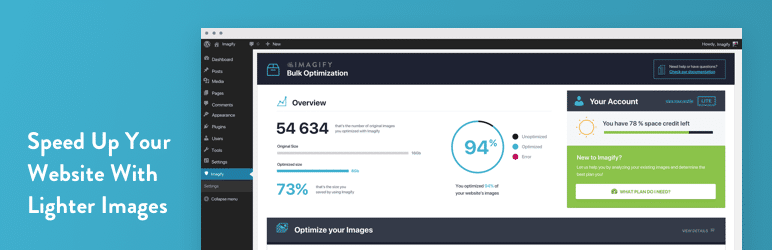
Speed up your website with lighter images without losing quality.
Imagify is the most advanced image compression tool, you can now use this power directly in WordPress.
After enabling it all your images including thumbnails and retina images from WP Retina x2 will be automatically optimized on the fly when you will add in into WordPress.
WooCommerce and NextGen Gallery compatible.
WHY USE IMAGIFY TO OPTIMIZE YOUR IMAGES?
You already have lots of unoptimized images? Not a problem, you will love the Bulk Optimizer to optimize all your existing images in one click.
Imagify can directly resize your images, you won’t have to lose time anymore on resizing your images before uploading them.
Three level of compression are available
- Normal, a lossless compression algorithm. The image quality won’t be altered at all.
- Aggressive, a lossy compression algorithm. Stronger compression with a tiny loss of quality most of the time this is not even noticeable at all.
- Ultra, our strongest compression method using a lossy algorithm.
With the backup option, you can change your mind whenever you want by restoring your images to their original version or optimize them to another compression level.
IS IMAGIFY FREE?
You can optimize for free 25MB of images (about 250 images) every month and you will receive a 25MB bonus upon registration.
Need more? Have a look at our plans: https://imagify.io/pricing
——————————
Notice: Download the plugin and install on your wordpress. If you don’t have an Imagify account, sign up for an account and get yourself a free code. OK
Once you have activated the plugin and enter the Free key received from imagify and the best thing will come to you. Wish success
What's included
- The full pluginEvery file from the developer's release, in one zip.
- Unlimited sitesInstall it on your own and your clients' sites.
- GPL licensedFree to use, study and modify.
- No paymentFree to download, no card needed.
How to install
- 1Download the zip file from this page.
- 2In WordPress, go to Plugins → Add New → Upload Plugin.
- 3Choose the zip, click Install Now, then Activate.
Questions
Is this the developer's own release?
Yes. It is the release published by the original developer, redistributed under the GNU General Public License. The GPL allows anyone to share and resell the code.
Do I get a license key or automatic updates?
No. License keys, one-click updates and support come from the developer's own paid plans. To update, download the newer version here when it is listed and install it over the old one.
Can I use it on more than one site?
Yes. The GPL puts no limit on the number of sites, including client sites.
Why is it free?
During our launch every download that is available on GPL Store is free. Nothing is charged and no card is asked for.