Overview
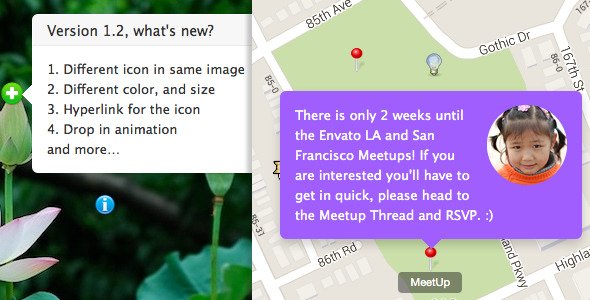
The Image Map HotSpot for WordPress help you to display tooltip or annotation of your image with smooth CSS3 transition. You can choose to display the popover when user click or mouseover, and easily drag the icon to update the HotSpot’s position in the backend. The working live preview is available in the backend, something like wysiwyg (What You See Is What You Get).The HotSpot works fine on the backend preview but not showing in the frontend?
Please try to wrap the shortcode with raw, like:[raw][hotspot id=789 /][/raw]
Some theme will add blank <p></p> to the content of the shortcode, this break the plugin. The raw tag will prevent it to add the unnecessary blank p tags.
- Easy to install and setup with WordPress, live working preview of the HotSpot on the edit page, help you update HotSpot easily, something like wysiwyg (What You See Is What You Get).
- Draggable icons in the backend, let you update the hotspot’s position easily with mouse drag, you can see the demo video in YouTube.
- 4 directions of popover, can be in top, right, bottom and left.
- Responsive, works fine with small screen device.
- Compatible with latest jQuery(1.10.x) and latest WordPress.
- Multiple HotSpot instance on same page, unlimited HotSpot you can add to a image.
- Enqueue the js and css only when needed. Keep WordPress page size smaller.
- You can add/edit the Image HotSpot without touching the code. Customize/update the image and text with WordPress backend.
- CSS3 transition support, fade only on the older browser, like IE8.
- Optional auto delay slideshow.
- FAQ and source code are included in the package. Free update in the future.
What's included
- The full pluginEvery file from the developer's release, in one zip.
- Unlimited sitesInstall it on your own and your clients' sites.
- GPL licensedFree to use, study and modify.
- No paymentFree to download, no card needed.
How to install
- 1Download the zip file from this page.
- 2In WordPress, go to Plugins → Add New → Upload Plugin.
- 3Choose the zip, click Install Now, then Activate.
Questions
Is this the developer's own release?
Yes. It is the release published by the original developer, redistributed under the GNU General Public License. The GPL allows anyone to share and resell the code.
Do I get a license key or automatic updates?
No. License keys, one-click updates and support come from the developer's own paid plans. To update, download the newer version here when it is listed and install it over the old one.
Can I use it on more than one site?
Yes. The GPL puts no limit on the number of sites, including client sites.
Why is it free?
During our launch every download that is available on GPL Store is free. Nothing is charged and no card is asked for.