Overview
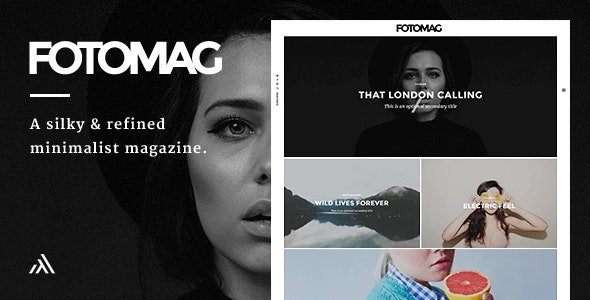
Fotomag is a silky-smooth and minimalist photography blog magazine for WordPress. Fotomag is anti-bloatware and only follows WordPress and general best coding standards to ensure Fotomag will probably be the easiest blogging WordPress theme you will ever set up and enjoy – all the options are completely controlled via WordPress’ customizer.
Fotomag was designed to focus completely on your beautiful imagery, with no unnecessary gimmicky distractions, so real visitors will feel extra engaged with your imagery and story telling. In essence, Fotomag is ideal for any modern website that wants to focus on story telling with beautiful imagery. From travel journals to recipe sites to company blogs. And everything in between.
General Features
- Custom CSS box to easily enter any specific visual customizations
- Custom JavaScript input to easily enter any custom JavaScript code
- Responsive design that looks great on screens of all shapes, orientations and sizes.
- Retina Ready (HD) WordPress photography magazine theme
- Comes with .mo/.po files for quick and easy translation. Some languages have already been translated.
- Integrated lightbox (can be turned on/off in the customizer)
- Touch-friendly slider and user experience
- Author pages can add social network icons that link to author profile links
- Logo options, including Retina logo option
- Set top and bottom padding for header (logo area)
- Almost everything can be turned on/off from the customizer
Pages Features
- Post Format: Gallery. Beautiful full-screen gallery that is super touch friendly and portrait-image friendly too. You can see the demo of it here: Gallery Post Demo
- Post Format: Video (Able to embed YouTube / Vimeo / Kickstarter / Viddler videos). They will appear in a minimalist lightbox at the press of the play button (YouTube starts playing automatically when the play button is pressed, and paused if the X button or background is pressed)
- Post Format: Audio(Able to embed any audio embed). They will appear in a minimalist lightbox at the press of the play button.
- Show Category Above Title (Can be turned on/off in Customizer)
- Down Arrow On Image (Can be turned on/off in Customizer)
- Like System (Can be turned on/off in Customizer)
- Progress Bar (Can be turned on/off in Customizer)
- Author Box (Can be turned on/off in Customizer)
- Publish Date (Can be turned on/off in Customizer)
- Tags (Can be turned on/off in Customizer)
- Sharing Block (Can be turned on/off in Customizer)
- Next + Previous Posts (Can be turned on/off in Customizer)
- Comments (Can be turned on/off in Customizer)
- Related Posts(Can be turned on/off in Customizer)
- Placeholder Image option to set a default image to show for posts without featured image.
Pages Features
- Progress Bar (Can be turned on/off in Customizer)
- Sharing Block (Can be turned on/off in Customizer)
- Comments (Can be turned on/off in Customizer)
Right Sticky navigation menu
- Set any background image or color for the slide in navigation menu
- Set an opacity value for background image to make it more/less visible
- Set the menu items font color to work with your chosen background image/color
- Add social media icons to bottom of slide in menu
Left Sticky navigation menu
- Add social media icons to appear on the left menu
- Show search icon + search lightbox modal (Can be turned on/off)
- Show subscribe + subscribe lightbox modal (Can be turned on/off) and recommended service is MailChimp
- Set text for subscribe button in left navigation menu
- Set text for subscribe lightbox modal title
- Set text for subscribe lightbox modal sub title
- Set any background image or color for subscribe lightbox modal/li>
- Set an opacity value for background image to make it more/less visible in the subscribe lightbox modal
- Set the subscribe lightbox modal font color to work with your chosen background image/color
Typography
- Set font family for titles (Select any Google font using a select option with all of them in the customizer)
- Set font family for body (Select any Google font using a select option with all of them in the customizer)
- Set font family special character extensions (None/One/Multiple can be ticked in the customizer)
- Set line height for desktops and mobiles (All easily controlled in the customizer)
- Set font size for desktops and mobiles (All easily controlled in the customizer)
- Set desired font color for article text (Easily controlled with colorpicker option in the customizer)
- Set desired font color for headings (Easily controlled with colorpicker option in the customizer)
- Set desired font color for blockquotes (Easily controlled with colorpicker option in the customizer)
- Set desired font color for links and links hover action (Easily controlled with colorpicker option in the customizer)
- Set desired font color for widget links and widget links hover action (Easily controlled with colorpicker option in the customizer)
What's included
- The full themeEvery file from the developer's release, in one zip.
- Unlimited sitesInstall it on your own and your clients' sites.
- GPL licensedFree to use, study and modify.
- No paymentFree to download, no card needed.
How to install
- 1Download the zip file from this page.
- 2In WordPress, go to Appearance → Themes → Add New → Upload Theme.
- 3Choose the zip, click Install Now, then Activate.
Questions
Is this the developer's own release?
Yes. It is the release published by the original developer, redistributed under the GNU General Public License. The GPL allows anyone to share and resell the code.
Do I get a license key or automatic updates?
No. License keys, one-click updates and support come from the developer's own paid plans. To update, download the newer version here when it is listed and install it over the old one.
Can I use it on more than one site?
Yes. The GPL puts no limit on the number of sites, including client sites.
Why is it free?
During our launch every download that is available on GPL Store is free. Nothing is charged and no card is asked for.